3 Design Patterns to Stop Polluting Your AI Agent's Context Window


I've been watching Gemini CLI development for a while, and I started noticing a pattern that felt... redundant. First, we got custom Slash Commands. Then Custom Sub-Agents. Now, we have Skills.
It started to feel like feature bloat. Why do we need three different ways to shove a prompt into the context window? Is this just marketing, or is there actual engineering logic here?
On the surface, it looks like a massive violation of SRP. If all three features are just dumping strings into the context window, why do we need three separate abstractions? Is this just feature bloat, or is there an actual architectural reason for the redundancy?
So off I went poking around the source code again. It turns out the real difference isn't in what they can do, but in how much work they make you do to keep the session (and your sanity) from collapsing.
Tracing the Signal through the Layers 🕵️♂️
The first "Aha!" moment comes when you trace the signal from your keyboard into the core engine. By looking at the actual code in packages/cli and packages/core, I realized these features live in completely different layers.
- The UI Interceptor: I looked at
packages/cli/src/ui/hooks/slashCommandProcessor.ts. Slash Commands are just Client-Side Macros. The CLI intercepts your/fixbefore the API even knows you're talking. It’s an input pre-processor that replaces a shortcut with a template. - The Core Capabilities: Then I looked at
packages/core/src/tools/activate-skill.ts. Unlike slash commands, Skills and Agents live in the logic layer. The model doesn't just "receive" them; it explicitly requests them via a Tool Call during the conversation.
The Token Economy: Floor Tax vs. History Debt 💰
Every turn in an LLM session is a transaction. You pay in tokens, and your budget is the Context Window. Based on my source-spelunking in GeminiChat.ts, the API payload can be thought of as two distinct context pools:
   1 {
   2   model: "...", // The agent's brain
   3   contents: [ ... ],         // THE HISTORY DEBT
   4   config: {                  // THE FIXED FLOOR
   5     systemInstruction: "...",
   6     tools: [ ... ],
   7     // ... other settings
   8   }
   9 }
🧱 1. The Fixed Context Floor
Every single turn, Gemini CLI resends a "Fixed Floor" of information—your agent's persona and the JSON schemas for every active tool.
- The Tool Tax: Every MCP server or tool you enable is a permanent tax on your Floor. If you have 100 tools active, your context window is partially full before you even type a word. This is the fast track to Context Collapse.
- The Command Win: Slash Commands have Zero Floor Impact. They never touch the
configobject.
📜 2. The History Debt
This is the dynamic contents array that grows with every message. This is where your session "blows up."
- Skills are Lazy-Loaders: They don't tax the Floor at all. They only add to your History Debt after the
activate-skilltool is called. But they are Sticky. Once injected, that "instruction manual" is part of your Debt forever. - Agents are the Ultimate Context-Hack: Delegation spawns a fresh
GeminiClientwith a Zero-History Floor. It resets the Debt to zero, performs the task in an isolated room, and only reports the final result back to your main history.
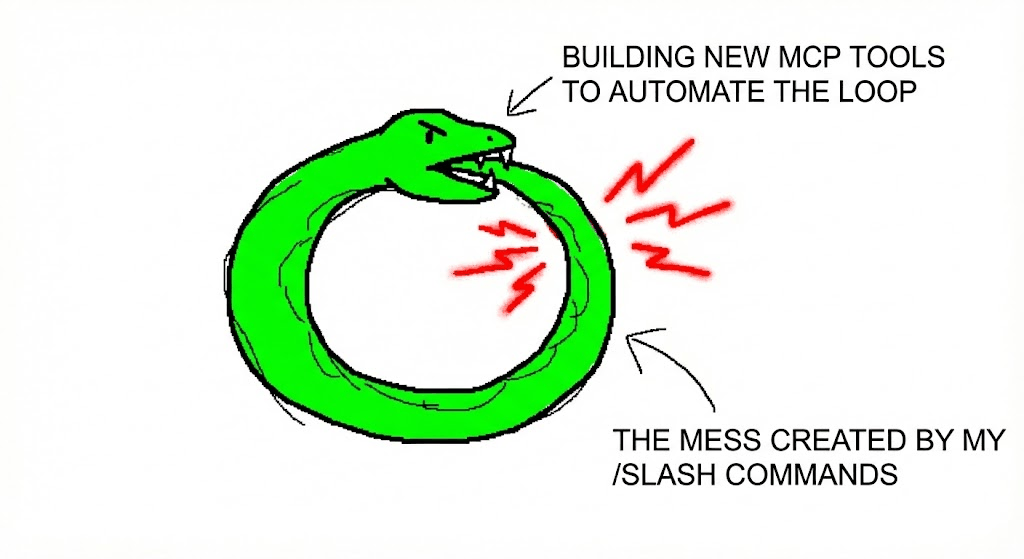
🐍 The Ouroboros: Why Steering AI Agents Always Feels Like a Loop
When I first started digging into this, I asked myself: "If I were building a CLI agent from scratch, would I even bother with all three features? Or could I just have one clean abstraction to handle everything?"
It seemed like a classic case of over-engineering. But as I mapped out each feature's actual workflow, I realized the redundancy is a natural evolution in our quest to reliably steer AI agents and hand off increasingly complex tasks. It's kinda funny really, check this out:
- The MCP Honeymoon: "MCP is awesome! Let's tool-up everything!" 🔌 You build tools for every API. It feels like unlimited power... but then the bills come due, which leads you to...
- The Floor Tax Crisis: "Damn, my context window is a shoebox!" 📉 You realize 50 tools means 50 JSON schemas taxing every turn before you even speak and wonder "If only there was a way to load the tool only when it's actually needed..." which leads you to...
- The Skill Honeymoon: "Skills are the answer! We can have it all!" 🧠 You convert your prompts to
SKILL.mdfiles to lazy-load your context, keeping your Floor lean while maintaining your specialized knowledge... but then you realize the model is a fickle partner that doesn't always take the hint and wonder "Why isn't it activating the skill when I'm clearly talking about it?" which leads you to... - The Trigger Friction: "Dammit, it won't trigger!" 😤 You're wasting turns just trying to beg the agent to "remember" its Kung Fu because semantic matching is a suggestive science, not a literal one, and you wonder "Why can't I just force this thing to inject the instructions right now?" which leads you to...
- The Command Coup: "I need direct control!" ⌨️ You bypass the AI's "choice" entirely. You type
/fixand you're finally back in the driver's seat... until you realize you're doing all the manual labor yourself and wonder "Is there a way to make these commands run themselves?" which leads you to... - The Automation Trap: "FML, I'm just a glorified macro-manager!" 🐍 It’s exhausting to manually chain commands every time you want to refactor, so you wonder "Why don't I just build a tool to automate this whole loop?"
And just like that, the snake bites its tail. You’re back to building MCP Tools to manage the mess created by your Slash Commands.
Picking Your Poison
After poking around the source, I've come to the conclusion that the "correct" feature to use depends entirely on what kind of cognitive load you’re trying to offload.
This is how I'm personally choosing between the three extension points when it comes to developing software:
1. Rituals (Slash Commands)
I use Slash Commands when I have a specific, well-defined ritual to follow. For example, before making a PR, I need to commit following my team's convention, run linters, fix the low-hanging fruit, and finally write the PR body according to a template.
This is a procedural task where I don't want the AI to "think". I want a lean context floor and a forced injection of a prompt that I know works every single time.
2. Standards (Skills)
I use Skills when I have a high-stakes standard to follow in a specific context. Think of code reviews or complex debugging sessions. I want the AI to "download" a specific set of rules, and it's actually helpful to maintain a trace of those interactions within the current session.
3. Results (Sub-Agents)
I'll use a Sub-Agent when I just don't care about the process; I only care about the result. If I need to refactor a massive legacy module or iterate on a set of failing tests, I don't want that noisy, multi-turn "how/why" cluttering my main workspace.
I want to outsource the context bloat entirely. Spawn the agent, let it perform its task in an isolated clean room, and have it report back only when the job is done.
Conclusion
In the world of LLMs, the context window is our most valuable—and finite—resource.
The existence of these three separate extension points for prompt injection isn't a design failure but a realistic response to the fundamental limitation of today's LLMs.
Steering an LLM is a constant battle against context pollution and the slow degradation of session intelligence. These features are essentially "Smart Engineering Tricks" that allow us to cheat the system. We are simply building the scaffolding necessary to keep the AI focused enough to be useful.