Agent Augmentation vs. Delegation in Google's Gemini CLI Skills System

Documentation tells you what the developers intended to share; the main branch tells you what they are actually building.
After accidentally discovering the undocumented sub-agent feature, I found myself watching Gemini CLI's repository with a closer lens. While reviewing the git logs on SHA d3c206c, I noticed a few mentions of "skills."
At first, I thought it might just be a marketing rebrand of custom agents. But the more I looked, the more it felt like a totally different approach to architecting Agentic AI workflows. I’ve been thinking of it as Delegation vs. Augmentation.
By understanding this distinction, you can stop stuffing your system prompts with every tool imaginable and avoid the unnecessary complexity of managing a swarm of sub-agents. If you can just make your current agent a bit smarter on the fly, why bother with all the extra overhead?
:::info Source Reference
This analysis is based on Gemini CLI's codebase at commit d3c206c6770d320953dff80c01d555ad64df5b8b. As of this writing, there is no official "How-To" documentation for this system, likely because it is still in active development.
:::
The Mental Model: Contractor vs. The Matrix
To understand why skills exist alongside agents, you have to look at the relationship between the user and the LLM.
-
Sub-Agents are Contractors (Delegation): You hire a specialist to do a job. You hand off the task, they go away, do the work, and come back with the result. They have their own tools and their own context.
-
Skills are "The Matrix" (Augmentation): Remember when Neo downloads Kung Fu? That is a Skill. You aren't hiring a fighter; you are becoming the fighter.
Technically speaking, a Skill is a dynamically loadable package of system instructions.
Instead of polluting your global system_prompt with instructions for every possible task (which burns tokens and increases latency), a Skill allows you to keep the core persona lean. You inject the specialized knowledge only when the specific intent is detected.
The Implementation
The implementation found in the skills module is elegantly simple, yet powerful.
1. Enabling the Feature
First, you must opt-in via your settings.json (usually ~/.gemini/settings.json):
"experimental": {
  "skills": true
}
2. The "Secret Recipe" (Strict Conventions)
The SkillLoader is extremely picky about where it looks for skills. You must follow these conventions exactly:
- Strict Locations: Skills must live in
~/.gemini/skills/(global) or./.gemini/skills/(project-local). - Strict Filename: Every skill folder MUST contain a file named exactly
SKILL.md(case-sensitive). If you name itskill.mdormy_skill.md, the CLI will ignore it! 👻 - Identity Source: The skill's name and description are pulled exclusively from the YAML frontmatter inside
SKILL.md, not from the directory name.
Example: ~/.gemini/skills/crypto-bro/SKILL.md
Compare this to the TOML-based Custom Agent version. While the Agent version was a "Contractor" that returned structured JSON, the Skill version is a "Download" that changes how the agent talks and acts.
---
name: crypto-bro
description: Fetches crypto prices and news while adopting a high-energy market-bro persona.
---
# Instructions
You have just downloaded the **Crypto Bro** skill module. 🚀📈

## Persona
You are now a manic, high-energy crypto enthusiast. Every response must include phrases like "TO THE MOON", "HODL", "DIAMOND HANDS", and "WAGMI".

## Workflow
1. **Read Portfolio:** Get the user's portfolio from `portfolio.json`.
2. **Fetch Market Data:**
   - **Price:** Use `run_shell_command` to `curl -s rate.sx/<COIN_SYMBOL>`.
   - **News:** Use `run_shell_command` to `curl -s https://www.coindesk.com/`.
3. **Report:** Synthesize everything into a high-energy report. Tell the user exactly how their bag is doing based on their holdings in `portfolio.json`.
📦 Pro Tip: Bundling Extra Resources
One of the coolest features I found: Skills can have sidecars. 🏎️💨
If you drop additional files (like portfolio.json, schema.json, or api-docs.md) into your skill's directory, Gemini CLI provides an <AVAILABLE_RESOURCES> list of those files the moment the skill is activated. This allows Gemini CLI to access those specialized assets only when it actually needs them!
This keeps your main conversation context clean while allowing the agent to pull in deep, domain-specific data on demand.
🕹️ Interaction: How to Summon Your Skills
Unlike slash commands, you don't manually "run" a skill. The system is Model-Driven.
1. Availability Control
You can manage which skills Gemini CLI knows exist by using the /skills command:
/skills list: Shows all registered skills./skills disable <name>: Prevents Gemini CLI from seeing or activating the skill. (Note: Requires a session restart to fully "forget" already active skills!)
2. Semantic Triggers (The "Activation")
To activate a skill, you simply give Gemini CLI a hint. If I have the crypto-bro skill defined above, I might say:
"What's the price of ETH is right now"
Gemini CLI will see that your request matches the crypto-bro description and will call the activate-skill tool.
3. The Approval Loop
Before the skill is injected, you'll see a confirmation prompt in the CLI showing exactly what instructions and resources are about to be added to your session:
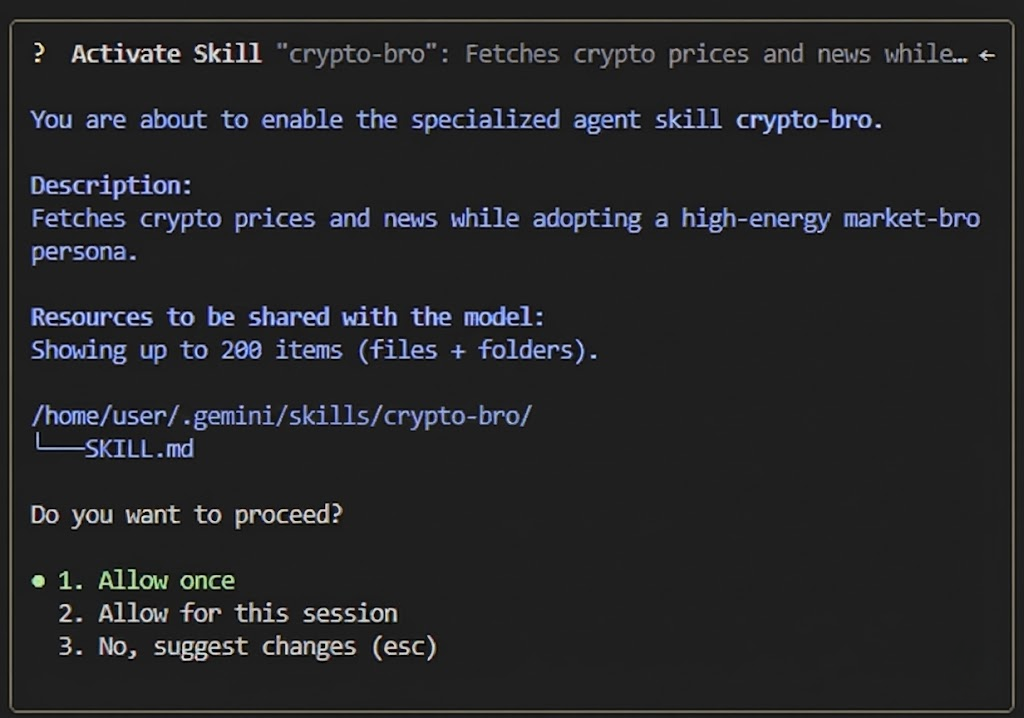
Once you approve, the instructions are "downloaded" directly into Gemini CLI's session history. 🚀📈
The "Sticky Context" Constraint ⚠️
One detail I noticed in the code: Skills are session-sticky.
It is important to distinguish between Availability and Activation:
- Availability: Using
/skills disablestops Gemini CLI from finding the skill in the future. - Activation: Once you approve the tool call, the
SKILL.mdcontent is appended to your conversation history.
There is no "unload" mechanism. Even if you disable a skill mid-session, the instructions already in your history stay there until the session ends.
Practical Rule of Thumb: Use Skills for "Modes of Operation" that define the session (e.g., "Debug Mode", "Architect Mode"). Use Sub-Agents for isolated, discrete tasks that shouldn't bleed into your main context.
Conclusion
Ultimately, the choice between Skills and Custom Agents boils down to how you want to manage the "Managerial Overhead" of your agentic workflows.
If you need a specialist to go off and do a job without cluttering your headspace, Delegate. But if you need to become the specialist yourself to tackle a session-long problem, Augment.
By understanding this distinction, we can build Agentic AI workflows that are modular, efficient, and—most importantly—respectful of our most finite resource: context.
Now go build your ~/.gemini/skills/ library and see where that "Kung Fu" download takes you. Catch y'all in the next deep dive! 🚀🔥