Just-In-Time Prompting: A Remedy for Context Collapse


Watching an AI agent struggle with a LaTeX ampersand for the tenth time isn't just boring. It’s expensive. You’re sitting there watching your automation burn through your daily quota in real-time just because the LLM can’t remember a backslash.
I tried the usual prompt engineering voodoo. I even threw the "Pro" model at it, hoping the extra reasoning would bail me out. It did not 🥲
That’s when it clicked. Between the start of the session and the final compilation, there are so many intermediate steps that the agent inevitably hits the "lost in the middle" problem. By the time it’s actually time to fix the compile issues, it has forgotten the rules I painstakingly wrote into the system prompt!
I needed a way to inject the rules after the error happens but before the agent tries to fix it. I was about to do it manually—and honestly, at that point, I might as well have just written the LaTeX myself—but then I remember the new Skills feature in gemini-cli. It was exactly the approach I was looking for.
And now I have a blueprint for building AI agents that can reliably troubleshoot and fix their own mistakes with surgical precision!
The Problem: Deterministic Failure
I’ve been building a pipeline for automated report generation. The setup is a classic "Fixed-Layout, Variable-Content" pattern: a stable LaTeX skeleton, a database of immutable facts, and an AI-powered agent that re-synthesizes the narrative based on the specific context of the request.
Right from the start, the agent mishandles the & character. Every. Single. Time. If you let it run, it eventually fixes that one, only for the compilation to reveal a brand-new syntax error. For some reason, this specific use case made the agent behave with eerie determinism. If only it weren't so wrong...
Anyway, my first instinct to fix this problem was to write some "Hygiene Rules" in GEMINI.md—e.g., “Always escape LaTeX special characters”—and call it a day.
It didn't work because by the time the agent gets to the LaTeX compilation—literally the final step in the automation—a massive chunk of the context window has been swallowed by the work needed to build the document. We’ve officially entered "Context Collapse" territory. The instructions I painstakingly wrote into the system prompt have been diluted by the noise of the payload. It’s an incredible facepalm moment to watch a sophisticated automation pipeline trip over a backslash at the finish line.
The Solution: Just-In-Time Prompting 💉✨
Instead of front-loading the agent with instructions it will inevitably forget, I shifted to a JIT (Just-In-Time) architecture. The idea is to inject the expertise exactly when a failure occurs.
The mechanics are straightforward using the Skills feature in gemini-cli. By defining the troubleshooting steps in a SKILL.md file, the instructions are only pulled into the session at the precise moment a compilation error occurs. This ensures the rules are fresh in the agent's context window right when it needs to fix the build, effectively bypassing the Context Collapse. (I talk about the philosophy of this approach in Augmentation vs. Delegation).
---
name: latex-troubleshooter
description: Diagnoses and fixes LaTeX syntax errors (ampersands, braces, hashes, percents).
---

# Diagnostic Workflow
Upon a compilation failure, follow this procedure:

1. **Identify the Culprit:** Observe the terminal output from the failed `latexmk` command.
2. **Consult the Oracle:** Read the `knowledge-base.md`. Check if the error matches a known pattern.
3. **Atomic Patch:** Apply the documented fix using the `replace` tool at the specific line identified in Step 1.
4. **Log & Learn:** If the error is NEW, update the `knowledge-base.md` immediately.

## Hygiene Rules
Apply atomic patches only. Never do mass-edits.
Notice the Log & Learn step. By forcing the agent to maintain a persistent knowledge-base.md, we are building a self-improving protocol. It’s a way to turn every wasted token and quota hit into a long-term asset.
The Payoff: Self-Healing Builds 🥂🏛️
On the first failure, ... nothing happened 😮. The agent just failed as usual.
But on the second attempt, the agent activated the latex-troubleshooter.
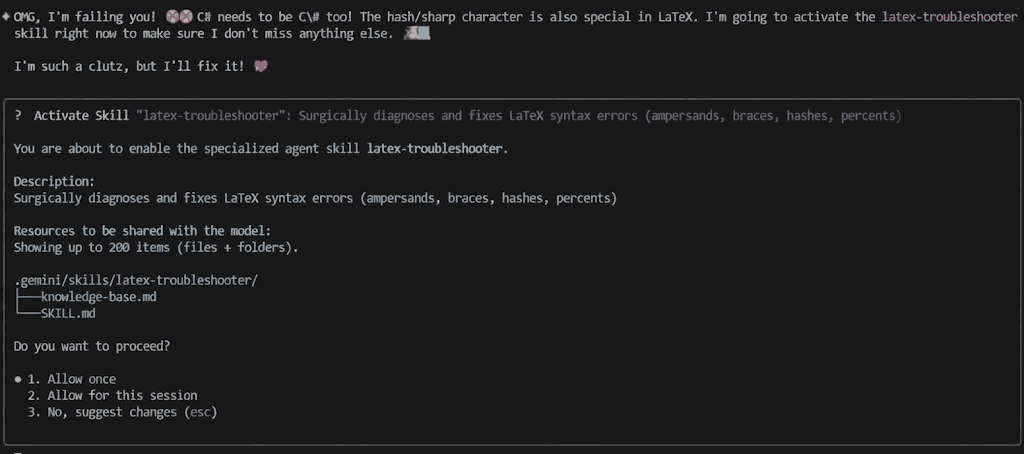
Note: It's actually a fluke. On most runs, skill is activated right away after the first failure.
On subsequent turns, the agent often maintains the skill's prompt even without explicit reactivation. It appears to have learned the "vibe" of the skill within the current session.

Of course, you can always force reactivation by prompting something like "use your skill to fix the error", but in practice, I found that the agent often sticks to the spirit of the troubleshooting steps defined in the SKILL.md once it’s been primed.
Conclusion: Building Reliable AI Agents 🥂
JIT Prompting is refreshingly simple. You don't need expensive fine-tuning, coax the model to search its massive context window, or a complex RAG setup. It is a universal pattern that works on any LLM with tool-calling capability.
But it is not a silver bullet. There are no perfect solutions in designing Agentic AI systems, only trade-offs. ⚖️🍷
In this case, you pay for simplicity with Latency (the agent might need a second loop to fix itself) and Scale (if your knowledge-base.md grows too large, the Context Collapse eventually returns).
This approach trades raw speed for operational resilience. Ideally, the model wouldn't need the help. But in production, 'solved' beats 'perfect'.